
Enhance Your Steam Experience with Augmented Steam
Overview
Augmented Steam is a Chrome extension designed to enrich the user experience on the Steam store and Steam Community. It serves as a functional enhancement for gamers who frequently browse game listings, compare prices, or track their gaming habits. The tool adds valuable data layers to Steam’s native interface, offering real-time insights into pricing, ownership status, and community metrics. By integrating information from external platforms like HowLongToBeat.com, SteamCharts.com, and SteamSpy.com, it transforms a standard browsing session into a more informed decision-making process.
Target users include casual and avid gamers, collectors, and bargain hunters who want deeper context before purchasing or adding games to their wishlist. The extension is particularly useful for those managing large libraries or seeking the best value across multiple regional stores. It also benefits users interested in game longevity, player engagement, and community sentiment through integrated ratings from OpenCritic and MetaCritic.
The developer did not provide additional background information. However, the extension is described as a spiritual continuation of the original Enhanced Steam project, indicating a community-driven effort to maintain and expand functionality. It operates entirely within the Chrome browser and does not alter Steam’s core gameplay or installation process. No direct integration with Steam’s client is implied beyond the option to open a game page in the installed Steam client.
Key Features & Capabilities
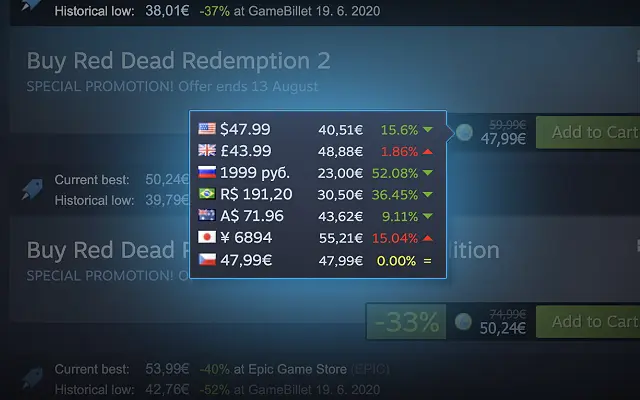
- Multi-Store Price Comparison – Displays the best current price from authorized retailers directly on the game’s store page, helping users identify the most affordable option without leaving Steam.
- Historical Price Tracking – Shows the lowest price ever recorded for a game, with a direct link to view full price history, enabling users to assess whether a current deal is truly exceptional.
- DRM Warning Highlight – Adds a more prominent notice about digital rights management restrictions, aiding transparency for users concerned about platform lock-in or regional limitations.
- Ownership & Wishlist Indicators – Visually highlights games already owned or in the user’s wishlist, reducing accidental purchases and improving library management.
- Search Result Filtering – Allows users to hide ignored games from search results, streamlining discovery and minimizing clutter.
- Regional Price Comparison – Provides a visual overview of how a game’s price varies across different regions, supporting informed purchasing decisions based on location.
- Infinite Scrolling – Replaces traditional pagination with continuous scrolling in search results, improving browsing efficiency and reducing navigation friction.
- Direct Steam Client Launch – Includes a button to open a game’s page directly in the installed Steam client, bridging browser and desktop experiences.
- Aggregate Ratings Integration – Displays OpenCritic scores and MetaCritic user ratings, offering a broader perspective on game quality beyond Steam’s own reviews.
- Playtime Insights – Pulls estimated playtime data from HowLongToBeat.com, helping users gauge how much time a game might require.
- Community Engagement Metrics – Integrates data from SteamCharts.com and SteamSpy.com to show estimated player counts and average playtime, revealing a game’s popularity and longevity.
- External Resource Links – Adds quick-access buttons to SteamDB, AStats, and other Steam-related tools, centralizing useful third-party data.
User Interface, Workflow & Performance
The extension maintains a clean, unobtrusive interface that overlays relevant data directly onto the Steam store and community pages. Navigation remains intuitive, with information presented in clearly labeled sections that do not interfere with the original layout. The UI design prioritizes readability and minimal disruption, ensuring that users can access enhanced data without confusion.
Workflow efficiency is significantly improved through features like infinite scrolling and search filtering, which reduce the need for repeated clicks and page reloads. The ability to instantly open a game in the Steam client streamlines the transition from browsing to launching, enhancing overall user satisfaction.
Performance observations are based on general software behavior patterns. The developer did not specify resource usage details. However, as a lightweight browser extension with a file size of 2.5 MB, it is expected to have minimal impact on system performance. Stability is assumed to be consistent with standard Chrome extension behavior, though no official benchmarks were provided.
Compatibility & System Requirements
Augmented Steam is compatible with the Chrome browser on any platform that supports Chrome, including Windows, macOS, and Chrome OS. The extension requires a Chrome version that supports the latest extension APIs, though specific version requirements were not listed.
Installation size is 2.5 MB, which is typical for a browser extension of this scope. The developer did not specify additional hardware or system requirements. No information was provided about support for other browsers or desktop operating systems beyond Chrome.
Pros and Cons
Pros
- Enriches Steam store with real-time pricing and historical data
- Improves decision-making with aggregated ratings and playtime estimates
- Enhances browsing efficiency through infinite scrolling and filtering
- Lightweight and fast, with minimal system impact
- Free to use, with no hidden costs or in-app purchases
- Respects user privacy by operating entirely within the browser
Cons
- Not compatible with browsers other than Chrome
- Does not enable game playback on Chromebooks or other non-PC devices
- Relies on external services; data accuracy depends on third-party sources
- May occasionally display outdated or incomplete information due to API delays
- No official support for mobile or tablet browsers
FAQ Section
Is Augmented Steam compatible with browsers other than Chrome?
Based on available information, the extension is designed exclusively for the Chrome browser. No support for other browsers such as Firefox, Edge, or Safari was mentioned.
Is the extension safe to use?
Yes, the extension operates within the Chrome environment and does not require access to sensitive user data. It does not collect personal information or install files outside the browser. However, as with any third-party extension, users should ensure they install it from the official Chrome Web Store.
Does the extension require an account or login?
No, Augmented Steam does not require a user account or login. It functions entirely based on the current browsing session and does not store or transmit personal data.
Can I use this extension on a Chromebook?
While the extension can be installed and run on a Chromebook, it does not enable game playback or client functionality on such devices. It only enhances the Steam website experience in the browser.
How often does the extension update its data?
Update frequency depends on the external services it pulls from. Data is refreshed dynamically during page load, but exact timing or caching intervals were not specified.
Final Thoughts
Augmented Steam delivers a powerful, no-cost enhancement to the Steam browsing experience. By integrating real-time pricing, ownership tracking, community metrics, and third-party reviews, it transforms Steam’s interface into a more intelligent and data-driven platform. Its lightweight design, intuitive layout, and focus on user efficiency make it a valuable tool for anyone who spends time on the Steam store or community.
While limited to Chrome and reliant on external data sources, its benefits far outweigh its constraints. Gamers seeking better value, deeper insights, and smoother navigation will find this extension indispensable. It stands out as a thoughtful, community-oriented upgrade that respects the original project’s legacy.
Download Augmented Steam now







